- Returns & Exchanges
- How To Return or Exchange
- Return Policy FAQ
- Ordering & Shipping
- Buy Online Pickup In-Store
- Place an Order
- Buy Gift Cards
- Payment Options
- Shipping & Handling
- International Orders
- Tracking or Changing Orders
- Get Order Status
- Change or Cancel
- Price Adjustments
- Shopping Tools & Tips
- Size Charts
- Get Email Updates
- Rewards Program
- Safety Alerts
- About Your Account
- Manage Your Account
- Contact Us
- Chat or Call
Payment options
When it comes to purchasing the products you love, you have a host of options.
To Pay with a Credit or Debit Card
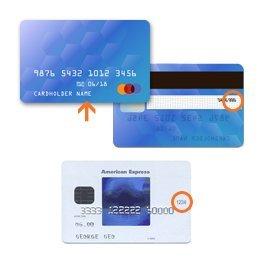
When you pay with a credit or debit card, you need the name printed on the
card, the
card number, the month and year the card expires, and the 3-digit or 4-digit
security code.
This iformation, along with the billing address for the credit card, is
entered
during the purchase process. For more information, see
"Placing your
order."
These credit cards are accepted at all of our stores and websites.


Debit cards issued by the financial services companies listed above are accepted at all of our stores and websites.
What happens next?
Credit cards and store credit cards are generally charged only at the time we ship
the item or items to you.
However for both credit and debit cards we may “pre-authorize” your order amount
with your card issuer at the time you place the order. This may trigger an
“authorization hold” on your card. For debit cards, which draw on funds in a bank
account, this means the amount of your purchase remains in your account but is no
longer available to you. For credit cards, the charge is not processed but the
amount may be deducted from your available line of credit.
Your credit or debit card will then be charged at the time we ship your items to
you. If your order is sent out in multiple shipments the charges will process as
each individual part of the order ships (you will see multiple, smaller amounts
charged to your account).
It can typically take three to seven days for the purchase amount to clear your
account. Your bank controls the timing of authorizations and payments from your
account; for details please check with your bank.
To Pay with a Gift Card
Redeeming a gift card is easy. During checkout, enter your gift card number in the “Add Gift Card/Store Credit” field. You’ll need both the 16-digit gift card number and the 4-digit PIN. You can apply up to five gift cards per order.
To Pay with Rewards
As a member of the Gap Inc. Canada Rewards Program, you earn points that can be redeemed for rewards in $1 increments. Rewards can be redeemed at our Family of Brands for the purchase of merchandise. Rewards cannot be used for the purchase of gift cards, for taxes or state fees, packaging fees, shipping & handling or delivery charges, charitable donations, and gift wrap charges.
To Redeem Online
- Log in to your account at checkout
- The "My Rewards" section will display your available points balance, as well as any valid rewards certificates
- Select the amount of points you want to redeem from the drop down
- Select "redeem" button to apply your rewards to your total
To Redeem In Store
- Enter your phone number on payment terminal
- Alternatively, associates can look up an email address
- The associate will see the customer’s available rewards points balance, as well as any valid rewards certificates
- The customer can choose how many rewards they wish to redeem
What happens next?
A message appears to confirm that the code has been applied to your order.
When you use a reward, we deduct that amount from your purchase total before
charging for the remainder.
For more information, see "About
the Rewards program."
To Pay with Promotional Discount
Each promotion, or special offer, has a code that you can type in during checkout, which tells our system to apply that particular offer or discount toward your purchase.
NOTE: Before using any promotion, be sure to check its terms and conditions for specific guidelines and restrictions. Some promotions are good only for certain items, while other promotions require that any remaining balance be paid using a Credit Card. Most of our promotions cannot be combined with other offers or discounts.
- When you're ready to purchase, go to checkout (or click the Checkout button in the top right corner of the website).
- In the payments section of checkout, enter the promotion code exactly as it appears in the promotion, including uppercase or lowercase letters. Be sure to avoid including a space before the promotion code, which sometimes happens if you cut and paste from an email or other electronic communication.
The codes are usually a combination of letters and numbers. Unique promotion codes
are 12 characters long (for example, "PWFXYPFGC2DD"). General promotion codes may be
shorter and represent the promotion more clearly (for example, "FREESHIP" or
"TAKE30OFF").
Depending on the promotion, you may be able to apply more than one promotion code to
a single online order. For example, if you have a promotion code for free shipping,
and another for 10% off an item, you may be able to use both. However, most of our
promotions cannot be combined with other offers or discounts.
What happens next?
A message appears to confirm that the code has been applied to your
order.
Promotion code values are applied to your purchase total first. You can use
another payment method, such as a Credit Card, to pay for the difference. (Many
promotions have specific payment requirements, so be sure to check the details
of the promotion before using it).
If the message says a promotion can't be applied: This usually happens when a
promotion has expired or can't be used with the items you want to purchase. Read
the promotion terms and conditions carefully to understand how the promotion can
and can't be used.
Also, some promotions cannot be combined. If you try to apply two such
promotions, we apply the one that has the biggest benefit to you and explain
what we did in a message during the checkout process. You can save the unused
promotional code to use later with a different order.
To Pay Using a Combination of Methods
You can pay for any purchase using several different methods.
Let's say you're buying a pair of jeans and a child's jacket. You can use a
promotions code for a 25% discount on the jacket, and then use up the last $27 on
the gift card you got for your birthday. If there's a balance remaining, you can pay
it with a debit card or credit card.
You could also redeem rewards in the payment mix.
You can use up to five promotion codes and rewards for a single purchase. That is, you can use one promotion and four rewards, or two promotions and three rewards, etc. Any rewards drawn from your points bank, regardless of value, count as one reward.
Promotion codes are always applied first to your purchase total, followed by rewards, gift cards, and then debit or credit cards.
To Pay with Apple Pay
Apple Pay can be used:
- To buy merchandise as well as gift cards. For additional information, see Buying a Gift Card .
- For orders available to ship-to-home. For additional information, see the related FAQ .
Apple Pay can't be used:
- In combination with other online purchase payment options.
- On orders placed via telephone.
- For orders that include any items to be picked up in store.
- For single orders that need to be picked up at multiple stores. For additional information, see Shipping & Handling.
- For orders that include made-to-order items sold and shipped by third-party sellers.
- For orders with backordered items.
Can I use Apple Pay as a Rewards member?
Rewards Members will earn 1 point for every $1 spent when using Apple Pay.
To Pay with Google Pay
Google Pay can be used:
- To buy merchandise as well as gift cards. For additional information, see Buying a Gift Card .
- For orders available to ship-to-home. For additional information, see the related FAQ .
Google Pay can't be used:
- In combination with other online purchase payment options.
- On orders placed via telephone.
- For orders that include any items to be picked up in store.
- For single orders that need to be picked up at multiple stores. For additional information, see Shipping & Handling.
- For orders that include made-to-order items sold and shipped by third-party sellers.
- For orders with backordered items.
Can I use Google Pay as a Rewards member?
Rewards Members will earn 1 point for every $1 spent when using Google Pay.
To Pay with Paypal
Paypal can be used:
- To buy merchandise as well as gift cards. For additional information, see Buying a Gift Card .
- For orders available to ship-to-home. For additional information, see the related FAQ .
Paypal can't be used:
- In combination with other online purchase payment options.
- On orders placed via telephone.
- For orders that include any items to be picked up in store.
- For single orders that need to be picked up at multiple stores. For additional information, see Shipping & Handling.
- For orders that include made-to-order items sold and shipped by third-party sellers.
- For orders with backordered items.
- In store
Can I use Paypal as a Rewards member?
Rewards Members will earn 1 point for every $1 spent when using Paypal.
Start a chat using the icon in the bottom-right corner of the
page.
Regular chat hours are daily,
7am – 1am ET
1-800-653-6289
(from inside Canada)
Please dial 711 for relay service.
Regular call hours are daily,
7am – 1am ET