- Returns & Exchanges
- How To Return or Exchange
- Return Policy FAQ
- Ordering & Shipping
- Buy Online Pickup In-Store
- Place an Order
- Buy Gift Cards
- Payment Options
- Shipping & Handling
- International Orders
- Tracking or Changing Orders
- Get Order Status
- Change or Cancel
- Price Adjustments
- Shopping Tools & Tips
- Size Charts
- Get Email Updates
- Rewards Program
- Safety Alerts
- About Your Account
- Manage Your Account
- Contact Us
- Chat or Call
Get the Status of Your Order
As soon as you place your order, you can see where it is on its way to your door.
Your order may take the full shipping timeframe to arrive to you. If your order shows "in-process"
that means we are getting your order ready to go! We will adjust the shipping method of your order
to make sure that it's delivered to you by the promised date. As soon as your order ships, we will
send you an email with the tracking information.
Track Your Order
Click "Orders and returns" to track your order. This link also appears in the top right corner of the website, above the Checkout button. You can either sign into your account to see your recent order history, or you can look up a single order by entering the order number and your email address.
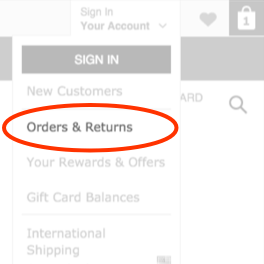
For each order, you can see order details and shipment summary. The shipment information includes a
tracking number for each package, which you can click to see the progress of your package.
In some cases, we may need to send an order in multiple packages that may arrive on different days.
When we do, we provide tracking information for all packages, as well as details on which items you
can expect in which package. You are charged only once if we choose to send your order in more than
one package.
For each order, you can see:
- Order details, such as your name, total price and the items included
- Shipping summary, including the shipping carrier used and a tracking number for the package
What happens next?
We process your order as quickly as possible to ensure that you receive it within the specified
delivery time. If your order doesn't arrive within that timeframe, contact us.
Occasionally, high demand causes us to run out of certain items. If we don't have an item that
you've ordered in stock, we notify you by email immediately.
In the rare instance that an out-of-stock item is not expected to come back in stock, we cancel the
order for that item. In this case, we don't charge you for the item or any taxes or shipping charges
related to it. You may see a temporary authorization on your credit card. However, if your order
includes other items, taxes and shipping for that part of your order are still charged.
Start a chat using the icon in the bottom-right corner of the
page.
Regular chat hours are daily,
7am – 1am ET
1-800-653-6289
(from inside Canada)
Please dial 711 for relay service.
Regular call hours are daily,
7am – 1am ET